
Here is an uncomfortable truth about your hotel’s Google Business Profile (GBP): there is a decent chance you have never actually looked at it from a logged-out phone in an incognito window. You’ve seen the dashboard. You’ve maybe replied to a snippy review about parking. But the thing your guests actually see — the rate carousel, the booking buttons, the photo that loads first — you’ve been flying blind on.
That’s the gap this post closes. GBP is the single highest-leverage free real estate you own in Google. It’s the panel that shows up when someone searches your hotel name, the pin that puts you in the local map pack, and increasingly the structured data Google’s AI features pull from when someone asks an assistant “where should I stay near the river district.” Get it right and you give ready-to-book travelers a reason to come straight to you instead of bouncing to an OTA and handing over 15-25% of the room rate.
You won’t make the OTAs disappear — nobody can, and anyone selling you that fantasy is selling you something. But a sharp profile measurably improves your OTA mix and claws back direct bookings you’re currently leaking. Let’s do the whole thing, in order, with the actual buttons and fields.
Relevance
Categories, attributes, services and content that match the search.
- Primary category
- Attributes
- Website relevance
Distance
How close you are to the searcher. You can't move — but you can earn relevance + prominence.
- Service-area clarity
- Accurate map pin
Prominence
How well-known and trusted you are online — the lever you control most.
- Review count & velocity
- Citations & links
- Mentions
Relevance · Distance · Prominence — prominence is where independents win
First, understand why hotel profiles are weird
Your profile is not a normal Google Business Profile. Lodging gets a special layout: a rate carousel pulling live prices, a booking module, a hotel-specific reviews summary, and amenity icons. That’s great for visibility and annoying for control, because Google locks down more fields on hotels than on, say, a taco truck.
The practical consequence: the name, address, and primary category are sticky. Once verified, you often can’t just edit them in the dashboard — changes can trigger a re-verification or require Google support. So the move is to get the foundational stuff right the first time, then spend your ongoing energy on the parts you can freely update: photos, posts, Q&A, and reviews.
Run this five-minute test before you change anything: open an incognito browser on your phone, search your exact hotel name, and screenshot what appears. Then search “boutique hotel near [your neighborhood]” and screenshot the map pack. That before-picture is your baseline. Most owners are genuinely surprised by what’s outdated, missing, or just plain wrong.
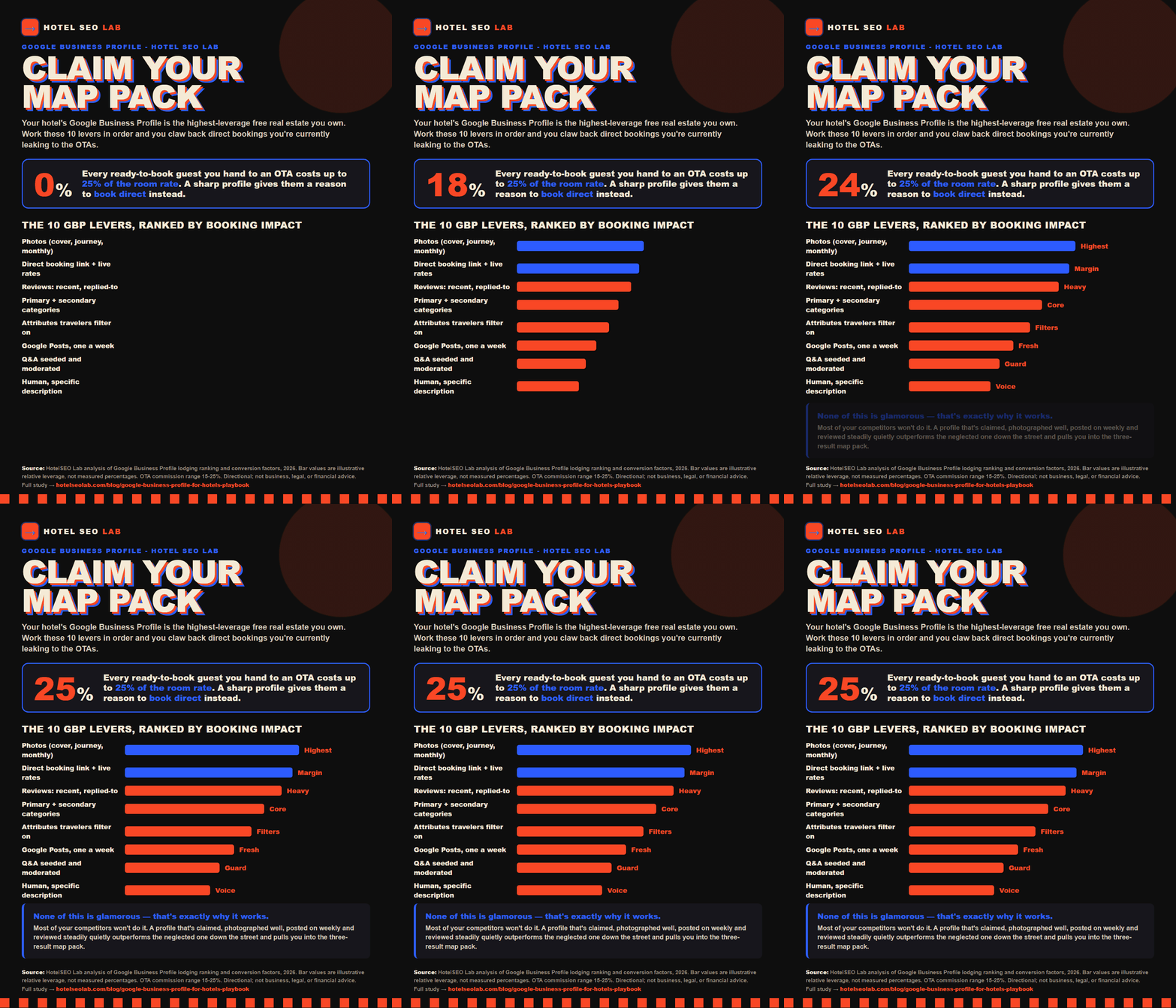
Download this study as a one-page PDF
Step 1: Claim and verify (and stop sharing one login)
If you haven’t claimed the profile, do that first at business.google.com. If a previous GM or a long-gone marketing agency claimed it, you may need to request ownership — Google sends a notification to the current owner and starts a transfer clock. Start that today; it can take days.
Verification for hotels is usually video or postcard. Have your business license, a utility bill, and signage photos ready so you can prove the property is real and yours.
Two ownership hygiene rules people ignore until it bites them:
- Add at least two owners, not one. When the owner-of-record leaves and nobody else has access, you’re locked out of your own profile and the recovery process is miserable.
- Use manager-level access for staff, not full ownership. Your front-desk lead can answer Q&A and post without being able to delete the whole listing.
Step 2: Get the categories right (this is bigger than it looks)
Your primary category is one of the strongest relevance signals Google has for which searches you show up in. For most properties it’s “Hotel,” but the right pick depends on what you actually are — “Bed & breakfast,” “Inn,” “Boutique hotel,” “Resort hotel,” “Extended stay hotel,” and others all exist and all behave differently.
Pick the primary category that matches your core identity, then stack secondary categories for the other true things you offer — a “Wedding venue,” an on-site “Restaurant,” a “Spa.” Secondary categories expand the queries you’re eligible for without diluting your primary signal. Don’t keyword-stuff with categories that don’t apply; Google’s getting better at noticing, and an inaccurate category can hurt you in the lodging layout.
This deserves its own deep dive, so we wrote one: see how to choose hotel Google Business Profile categories for the full decision tree and the sneaky secondary categories most independents miss.
Step 3: Attributes — the amenity checklist travelers filter on
Attributes are the structured amenities Google shows as icons and uses as filters: free Wi-Fi, pet-friendly, pool, free breakfast, EV charging, accessible entrance, air conditioning, on-site parking, and dozens more. When a traveler filters “pet friendly” or “free parking,” your attributes are what put you in or out of that results set.
Go through every attribute and set it honestly and completely. Two failure modes to avoid:
- The lie of omission. You have a pool but never toggled it on, so you’re invisible to pool-filterers. Free 90 seconds of work, real lost bookings.
- The aspirational fib. You toggle “free breakfast” because you put out a coffee pot and two bagels. Guests will roast you for it in reviews, and a one-star “the ‘breakfast’ was a stale bagel” review costs more than the booking you gained.
Make this a quarterly review. Amenities change — you add EV chargers, you start allowing dogs, you kill the breakfast — and the profile should track reality.
Step 4: Write a description that sounds like a human
Hotels get a “from the business” description field. This is one of the few places you control the narrative copy, so don’t waste it on “We offer comfortable accommodations for business and leisure travelers.” That sentence appears on roughly nine million profiles and tells a guest nothing.
A good hotel description does three jobs in about 500-750 characters:
- Establish what kind of place you are — the vibe, the era of the building, the neighborhood. “A 22-room 1920s railroad hotel two blocks off the riverwalk.”
- Name the specific things people choose you for — the rooftop bar, the dog-friendly suites, walkable distance to the convention center.
- Sound like a person wrote it. Warmth beats keyword density every time, and Google doesn’t rank you on keyword stuffing here anyway.
Write the description you’d want to read at 11pm on a phone after a delayed flight, when you’re deciding between you and the chain across the street. That traveler doesn’t want “premier hospitality destination.” They want to know if the bar’s still open and whether the dog can come.
Avoid promotional language and phone numbers in the description — Google’s guidelines disallow them and may reject the edit.
Step 5: Photos — your highest-leverage ongoing work
Photos do more day-to-day booking work than almost anything else on the profile. A traveler scans images for two seconds and makes a gut call. Blurry lobby shot from 2017? Next. A crisp, well-lit, genuinely appealing set? They keep reading.
The non-negotiables:
- Replace the cover and logo first. These load biggest and set the first impression.
- Cover the full journey: exterior (so people recognize the building from the street), lobby, several room types, bathrooms (yes, really — travelers hunt for these), common areas, food, the view, the neighborhood.
- Shoot horizontal, in daylight, with a real camera or a recent phone. Skip the heavy filters; travelers smell a staged lie and Google may strip overly edited shots.
- Add a fresh batch monthly. Recency is both a guest signal and an activity signal to Google.
We get into resolution, ordering, what guest-uploaded photos do to your set, and how to nudge the photo Google chooses to feature in the hotel GBP photo playbook. This is the post to forward to whoever holds the camera.
Step 6: The booking link — where margin actually moves
Here’s the part that touches your bank account directly. Your hotel profile has a booking module, and Google often populates it through connected rate partners — which can include OTAs. If the most prominent “Book” path sends a ready-to-buy guest to an OTA, you just paid commission on a booking that was standing on your doorstep.
What to do:
- Make sure your direct booking option is present and current. Connect your booking engine through a Google-supported integration (many booking engines and channel managers offer this) so your own rates and a direct link appear in the module.
- Keep rates accurate. A stale or mismatched rate in the carousel erodes trust and can suppress your direct option.
- Confirm the “book direct” link actually lands on a working, fast, mobile-friendly booking page — not a homepage where the guest has to re-find the dates they already chose.
This won’t end OTA bookings — they’ll keep sending you guests, and that’s fine, it’s a healthy part of the mix. But every traveler who clicks your direct link instead is a booking at full margin. Over a year, shifting even a modest share of profile-driven bookings to direct is real money. If you want this wired up properly, our local SEO and GBP service handles the integration end to end.
Step 7: Google Posts — the channel almost nobody uses
Posts are mini-updates that show on your profile: offers, events, news, seasonal packages. Most independent hotels post zero times a year, which means even a little consistency makes you stand out as an active, well-run property.
A simple cadence that works:
| Week | Post type | Example |
|---|---|---|
| 1 | Offer | ”Midweek 3rd-night-free through October” |
| 2 | Event | ”Live jazz on the rooftop Friday, 7pm” |
| 3 | What’s new | ”Renovated garden suites now bookable” |
| 4 | Local angle | ”Walking-distance guide to the food district” |
Each post needs a strong image, ~100 words of real copy, and a clear call to action button pointing at the relevant page — ideally your direct booking or offers page, not an OTA. Posts also feed Google fresh signals and give you something to show in the AI-generated summaries that increasingly answer travel questions. We laid out a copy-paste weekly system in the Google Posts for hotels playbook.
Step 8: Questions and answers — moderate it, don’t ignore it
The Q&A section is public and, crucially, anyone can answer — including past guests who get it wrong and competitors who are not your friends. Unmanaged Q&A is where misinformation about your pet policy, parking, and check-in time goes to live rent-free.
The fix is two-part:
- Seed it yourself. Post the real FAQs as questions from your business account and answer them: parking, check-in/out times, pet policy, airport distance, cancellation terms. You control the canonical answer and you pre-empt the wrong one.
- Monitor and upvote. New questions need fast, friendly answers, and upvoting the correct answer pushes it to the top. Set a weekly reminder so nothing sits unanswered for a month.
Full process, including the exact FAQs we seed for new clients, is in managing Google Q&A for hotels.
Step 9: Reviews — quantity, recency, and your replies
Reviews are a heavyweight ranking and conversion factor, and for hotels they roll up into that prominent reviews summary. Three things matter more than chasing a perfect star average:
- A steady flow of recent reviews. Forty reviews where the newest is from last week beats two hundred where the newest is fourteen months old. Recency reads as “people are staying here and liking it right now.”
- You reply to all of them — the glowing ones with genuine warmth, the rough ones with a calm, specific, non-defensive response. Future guests read your replies to judge how you handle problems. A measured reply to a one-star can win more bookings than the one-star cost you.
- You ask at the right moment. Build the request into checkout: a card at the desk, a follow-up email the morning after a great stay. Never offer anything in exchange for a review — that violates Google’s policy and can get reviews stripped.
Reviews plus categories plus proximity are also what drive your placement in the three-result map pack. If ranking in that pack is the goal, read how to win the local map pack for hotels next.
Step 10: Make it AI-ready
Increasingly, travelers don’t visit your profile — they ask an AI assistant, and the assistant summarizes from structured data. Your GBP is a primary source for that. A complete, accurate, consistently updated profile is exactly the kind of clean structured information AI features prefer to cite. This is where AEO (the broader practice — 27,100 US searches a month) intersects with plain old local SEO.
The same fundamentals do double duty: accurate categories and attributes, current rates, fresh photos, real reviews, seeded Q&A. Spell out the specifics a model needs — distance to the airport, pet policy, parking, breakfast — in your description, posts, and Q&A, because that’s the stuff that gets pulled into AI answers. More on that in getting your hotel cited in Google AI Overviews and across our AI visibility (AEO and GEO) work.
The complete checklist
Print this. Tape it somewhere. Work it top to bottom.
- Profile claimed; ownership transferred if a former agency or GM holds it
- At least two owners; staff on manager-level access
- Primary category matches your true identity
- Secondary categories added for every real offering (venue, restaurant, spa)
- Every applicable attribute toggled on, honestly
- Description rewritten to sound human, specific, no phone numbers or promo copy
- Cover and logo replaced; full photo journey covered; horizontal, daylight, current
- Direct booking link connected, rates accurate, mobile booking page tested
- One Google Post a week, real image and CTA, pointing to your own pages
- FAQ questions seeded and answered from the business account
- Weekly Q&A monitoring reminder set
- Reply to every review; steady, recent review flow; review ask built into checkout
- Whole thing re-checked from a logged-out phone once a quarter
None of this is glamorous, and that’s exactly why it works — most of your competitors won’t do it. A profile that’s claimed, accurate, photographed well, posted on weekly, and reviewed steadily quietly outperforms the neglected one down the street, pulls you into the map pack, and gives more travelers a clean path to book direct. You’ll still get OTA bookings, and that’s fine. You’ll just keep more of the margin on the ones you win back yourself.
Want this done for you?
If you’d rather hand the whole playbook to someone who runs it every week, that’s literally our job. Book a free intro call and we’ll audit your live profile on the spot, or see what GBP and local SEO management looks like and where it sits in our pricing.